Shop
Write, publish, restock and retire shop listings from Dashboard → Shop, and handle orders, fulfilment and reversal.
Your shop sells awards, codes and manually delivered items to your players, priced in your own
currencies. Dashboard → Shop is where you write the catalog: listings with a price, what they
deliver, their stock, a per-player limit and an optional scheduled discount. You then publish,
revise, restock or retire them. Players see published listings in the Shop tab of /player.
Every price, discount and availability figure on the page is read back from the service. The page never computes what a buyer pays.
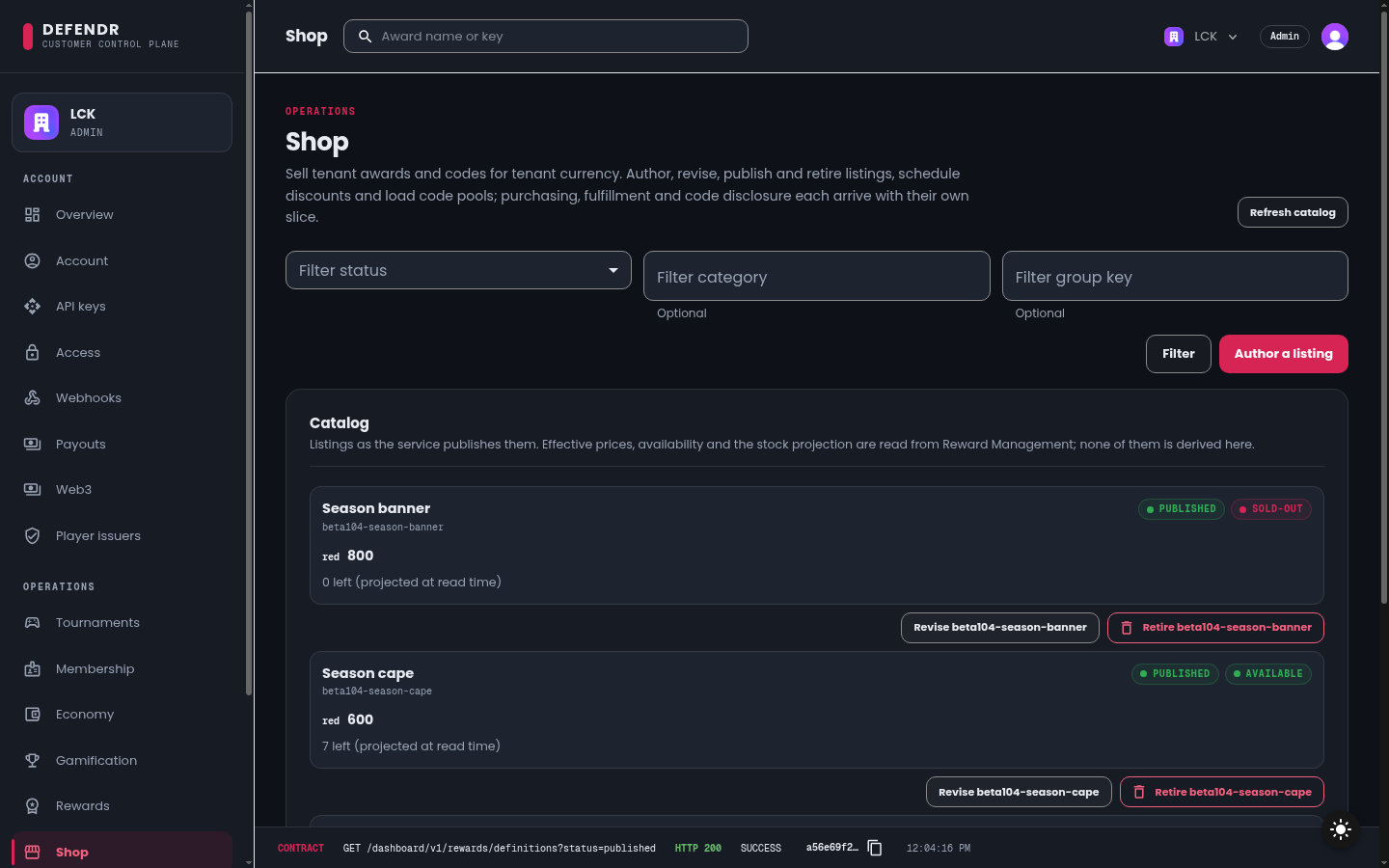
The catalog
The Catalog section lists your listings with their status, effective price, any running discount and availability. Filter by Filter status, Filter category and Filter group key, then select Filter. Refresh catalog reads it again.
A listing moves through three statuses:
| Status | Available actions |
|---|---|
draft | Revise, Publish, Load units into (code pools only) |
published | Revise, Retire, Load units into (code pools only) |
retired | None. A retired listing cannot be revised, published or restocked; orders already settled against it are unaffected |
Author a listing
-
Select Author a listing. The Author a Shop listing dialog opens.
-
Describe it: Listing key (lowercase words joined by hyphens, for example
gold-skin-pack; it cannot change later), Title, Description, Category, Media URL, and optionally a Group key and Group order to arrange listings together in the player's shop. -
Pricing: pick one of your published currencies in Currency and enter a Price as a whole number of that currency's smallest unit.
-
Fulfillment and stock: choose what a purchase delivers and how many there are.
Fulfillment Delivers awardA published award definition, chosen in Award definition codeA code from the listing's code pool manualSomething your team delivers by hand Stock policy Meaning unlimitedNo stock limit countedA counter set in Units left code-poolOne unit per loaded code; stock by loading codes -
Purchase limit (optional): tick Limit purchases per Player, then set Purchases per Player and a Window of
day,weekortotal. Without a limit a player may buy as often as stock allows. -
Scheduled discount (optional): tick Schedule a discount, choose a Discount kind (
percentageoff, or anabsolutereduction in the listing's currency), and set Discount starts and optionally Discount ends. Whether a discount is running is decided by the service at read time. -
Select Create draft. The listing appears as
draft.
Publish
Select Publish on a draft and confirm. Publishing puts the listing on sale for every player of your tenant at the price and discount window it currently carries.
Revise
Select Revise to open the listing with its current values. Everything you save becomes the listing's new shape. A published listing re-runs every publish rule and is announced to buyers under a new revision.
For a counted listing, Units left replaces the counter; it does not add to it. Units that sell
while the dialog is open are never put back. If you leave Units left as it was, saving keeps
every sale made in the meantime. If you change it and a unit sold since you opened the listing, the
save is refused, the dialog stays open with everything else you typed, and Units left is
refilled with the count the listing holds now. Set the figure again and save.
Load codes into a code pool
- Select Load units into on a
code-poollisting. - Paste the codes into Units, one per line: at most 500 per load, each up to 256 characters.
- Select Load units. The Restock outcome shows what was accepted.
Each code is encrypted before it is stored, and no catalog or order read ever returns it.
Retire
Select Retire, optionally give a Reason, and confirm. Retirement is terminal.
Orders, fulfilment and reversal
A player's checkout is one all-or-nothing operation that never charges twice. The Order queue
section of Dashboard → Shop shows the latest 100 matching orders, newest first. Filter by
Filter order status, Filter listing key and Filter player id, then select
Filter orders. Refresh orders reads the queue again. Each action needs org:admin and its
own scope on the key behind the dashboard, so that no single permission can both edit the catalog
and move value back:
| Action | Offered on | Scope |
|---|---|---|
| Claim a manual order to work on | awaiting-fulfillment | shop:fulfill |
| Complete a claimed manual order, with an optional Delivery note | in-progress | shop:fulfill |
| Reverse an order and refund the player | settled, awaiting-fulfillment, in-progress, fulfilled | shop:reverse |
| Disclose code sold with an order (break-glass) | settled orders that delivered a code | shop:disclose-code |
- Complete records the order as fulfilled and notifies the buyer. If the order had already been completed with a different note, the dialog says so and shows the note the service holds rather than yours. The queue then shows who completed it.
- Reverse asks for a Reason code (uppercase letters, digits and
_), a Reason, and, for an order that delivered a code, a tick on The delivered codes cannot be recovered. You enter no amount: the service refunds exactly what the order's own debit took, and the dialog shows that refund, the ledger operation and what happened to each line. Stock is not restored; load units again if they should be sold. Reversed and cancelled orders show their full reversal record in the queue. - Disclose code is a break-glass action. You must give a Reason for this disclosure. Every
disclosure writes an audit record with your reason, the order and the credential that read it, and
disclosing again writes another. The codes are shown once, in the dialog only, and are cleared
when you select Close and clear. The dialog cites the audit record's id so you can quote it in
the support conversation.
shop:disclose-codeis granted on its own and no other Shop scope implies it, so if the dashboard key does not hold it the action is removed after the first attempt until you reload the page.
The dashboard acts through one shared credential, so claims, completions, reversals and disclosures are all recorded against that credential, not against you as an individual operator.
The same actions are available through the Shop API:
| Task | Route | Scope |
|---|---|---|
| Read orders | GET /v1/shop/orders | shop:read |
| Claim a manual order to work on | POST /v1/shop/orders/:orderId/claim | shop:fulfill |
| Record a manual order as fulfilled | POST /v1/shop/orders/:orderId/fulfillment | shop:fulfill |
| Reverse an order and refund the player | POST /v1/shop/orders/:orderId/reversal | shop:reverse |
| Disclose a code sold with an order | POST /v1/shop/orders/:orderId/code-disclosures | shop:disclose-code |
See Orders and Reversal. Players get an inbox notification, and your webhook endpoints an event, at each step of the order lifecycle.
What can go wrong
| What you see | Why | What to do |
|---|---|---|
| You have read-only access in the dashboard. | Your dashboard role is org:member | Ask an admin |
| A notice starting Shop administration requires followed by a scope | The key behind the dashboard does not hold shop:mutate | Contact Tanitar; controls stay disabled until the next successful read |
| No currency offered in Currency | A listing can only be priced in a published currency | Publish one under Dashboard → Economy |
| No award offered in Award definition | Only published award definitions can be sold | Publish one under Dashboard → Rewards |
| The Shop service could not be reached. | The service did not answer | Check your connection and select Refresh catalog |
| A listing cannot be revised or restocked | It is retired | Author a new listing |
A notice that claiming and completing require shop:fulfill | The dashboard key does not hold shop:fulfill | Contact Tanitar; claim and complete stay disabled until the next successful read |
A notice that reversing requires shop:reverse | The dashboard key does not hold shop:reverse | Contact Tanitar; reverse stays disabled until the next successful read |
A notice that the dashboard key does not hold shop:disclose-code | That scope is granted on its own | Contact Tanitar; Disclose code is removed until you reload the page |
SHOP_CODE_LOSS_UNACKNOWLEDGED when reversing | The order delivered a code and the loss was not acknowledged | Tick The delivered codes cannot be recovered |
SHOP_ORDER_NOT_REVERSIBLE or SHOP_ORDER_TRANSITION_CONFLICT | The order changed state, for example the player cancelled it | The queue is refreshed; read the order's new status |
SHOP_CODE_UNAVAILABLE when disclosing | The order no longer holds a code, for example it was reversed | Nothing to disclose |