Missions
Author a mission, have a second principal approve it, and publish it to your players from Dashboard → Gamification.
A mission turns something a player does into progress and a reward: "win three Valorant matches today" pays 200 XP and a chest. Missions live under Dashboard → Gamification, in the Mission catalog section. Authoring is a form, not a script. Every mission is approved by a second principal before any player can see it.
To manage missions from your own tooling instead, see Mission catalog.
The mission lifecycle
flowchart LR
  A[Author] --> B[Pending approval]
  B -->|Approve and publish, by another principal| C[Approved and published]
  C -->|Edit trigger or payout| B
  B -->|Disable| D[Disabled]
  C -->|Disable| D
The stat tiles at the top of the Gamification page count your Missions, how many are Approved and Published, and how many are Awaiting approval. The first time the catalog is listed, it includes a seeded starter pack of missions, so it is never empty.
Author a mission
-
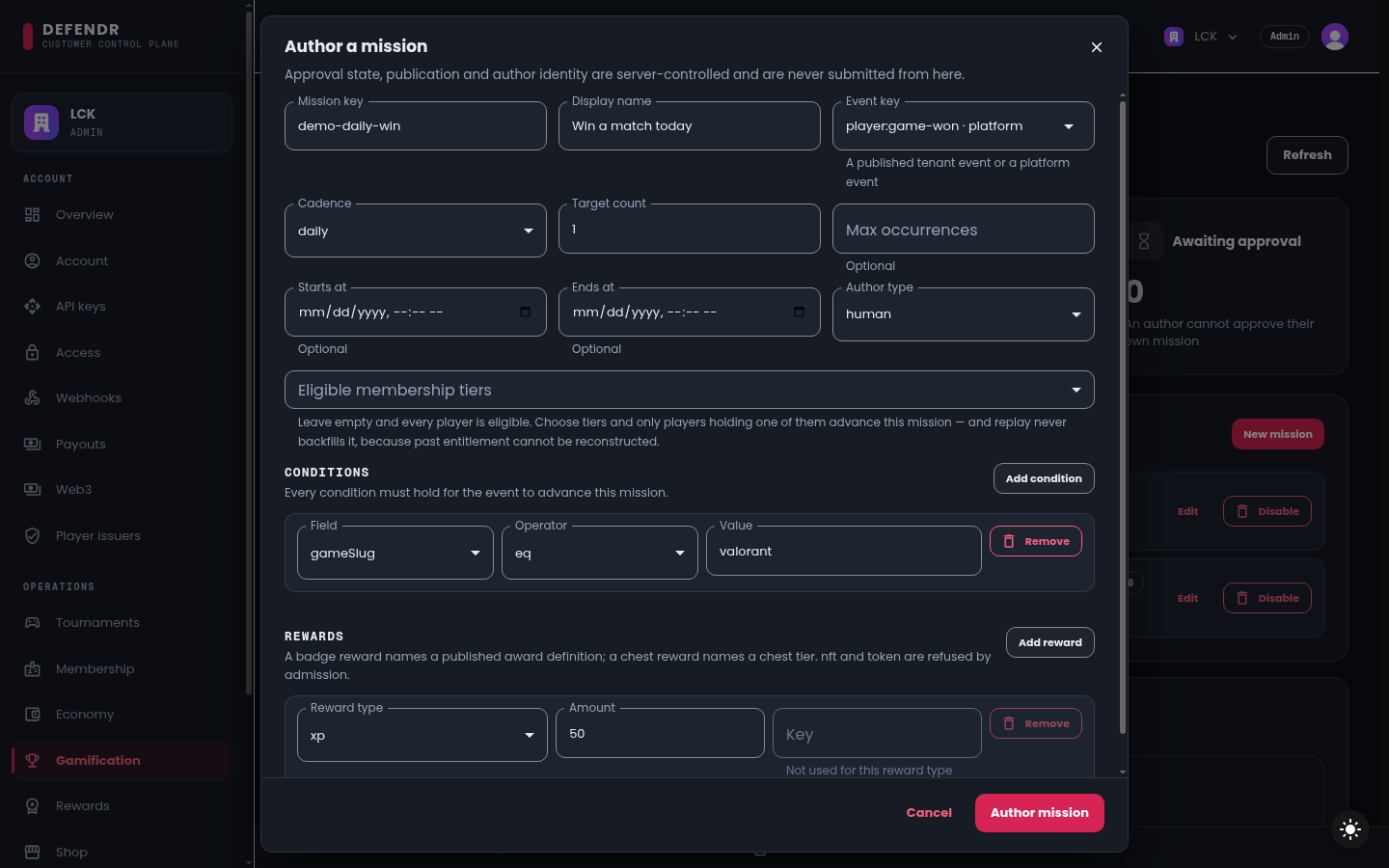
In Mission catalog, select New mission. The Author a mission dialog opens.
-
Name it:
- Mission key: a stable identifier, for example
win-three-today. - Display name: what players read, for example
Win three matches today.
- Mission key: a stable identifier, for example
-
Choose what advances it:
- Event key: the event that counts. The list offers the platform events
player:game-won,tournament:completedandreward:granted, plus every event you declared and published in the Event registry section of the same page. - Conditions (optional): each condition is a Field, an Operator (
eq,neq,gt,gte,lt,lte,in,notIn) and a Value. Every condition must hold for an event to count, for examplegameSlug eq valorant.
- Event key: the event that counts. The list offers the platform events
-
Choose how it counts:
- Cadence:
one-time,daily,weeklyorspecial. - Target count: how many matching events complete it.
- Max occurrences, Starts at, Ends at (all optional).
- Cadence:
-
Choose who can take part in Eligible membership tiers. Leave it empty and every player is eligible. If you choose tiers, only players holding one of them advance the mission, and a later replay does not backfill players who were not eligible at the time.
-
Add up to five Rewards. Each has a Reward type:
Type Pays xpExperience points toward the player's level battlePassXPExperience toward the current battle-pass season chestA chest of the named chest tier, into the player's inventory currencyAn amount of one of your published currencies badgeA published badge award definition -
Set Author type (
humanorai-generated), then select Author mission.
The mission appears in the catalog as a draft and in the Approval queue. Approval state, publication and author identity are set by the service; you cannot submit them from the form.
Approve and publish
Approval is the only way a mission is published, and the principal that authored a mission cannot approve it. The check compares the principal that made each call, not the person at the keyboard.
The dashboard's Operations pages act on your tenant through the API key the dashboard is configured with. Every mission authored in the dashboard therefore has that key as its author, and the dashboard cannot approve it, whoever selects the button. Use two different principals:
- Author in the dashboard, approve with your own API key. Call
POST /v1/gamification/catalog/approvalswith a key that holdsgamification-catalog:approve(see Mission catalog). - Author with your own API key, approve in the dashboard. The mission appears in the Approval queue; select Approve & publish.
Once approved, the mission is published and players see it in their missions list.
Edit and disable
- Edit opens the same form. Changing what a mission triggers on or what it pays returns it to pending approval and unpublishes it until someone approves the new terms. Approval never carries over to terms nobody approved.
- Disable retires a mission. A disabled mission cannot be approved.
What can go wrong
| What you see | Why | What to do |
|---|---|---|
GAMIFICATION_AUTHOR_CANNOT_APPROVE | The same principal authored the mission and is trying to approve it | Approve with a different principal, as described above |
GAMIFICATION_MISSION_DISABLED | The mission is disabled | Author a new mission |
| No published events in Event key | You have no published tenant events | Publish one in Event registry, or use a platform event |
| No published currencies or No published badges | A currency or badge reward can only name a published one | Publish the currency under Dashboard → Economy, or the badge under Dashboard → Rewards |
| A refusal naming a scope | The calling key lacks gamification-catalog:author or gamification-catalog:approve | Use a key that holds it; for the dashboard's own key, contact Tanitar |
| Mutation controls are disabled in the dashboard. | Your dashboard role is org:member | Ask an admin |