The dashboard at a glance
What administrators do in the Tanitar dashboard and where each task lives.
The dashboard is where the administrators on your team configure and run your Tanitar tenant without writing code. Everything it does goes through the same services your integration calls. Account pages use your own organization session; Operations pages act through the API key the dashboard is configured with for your tenant.
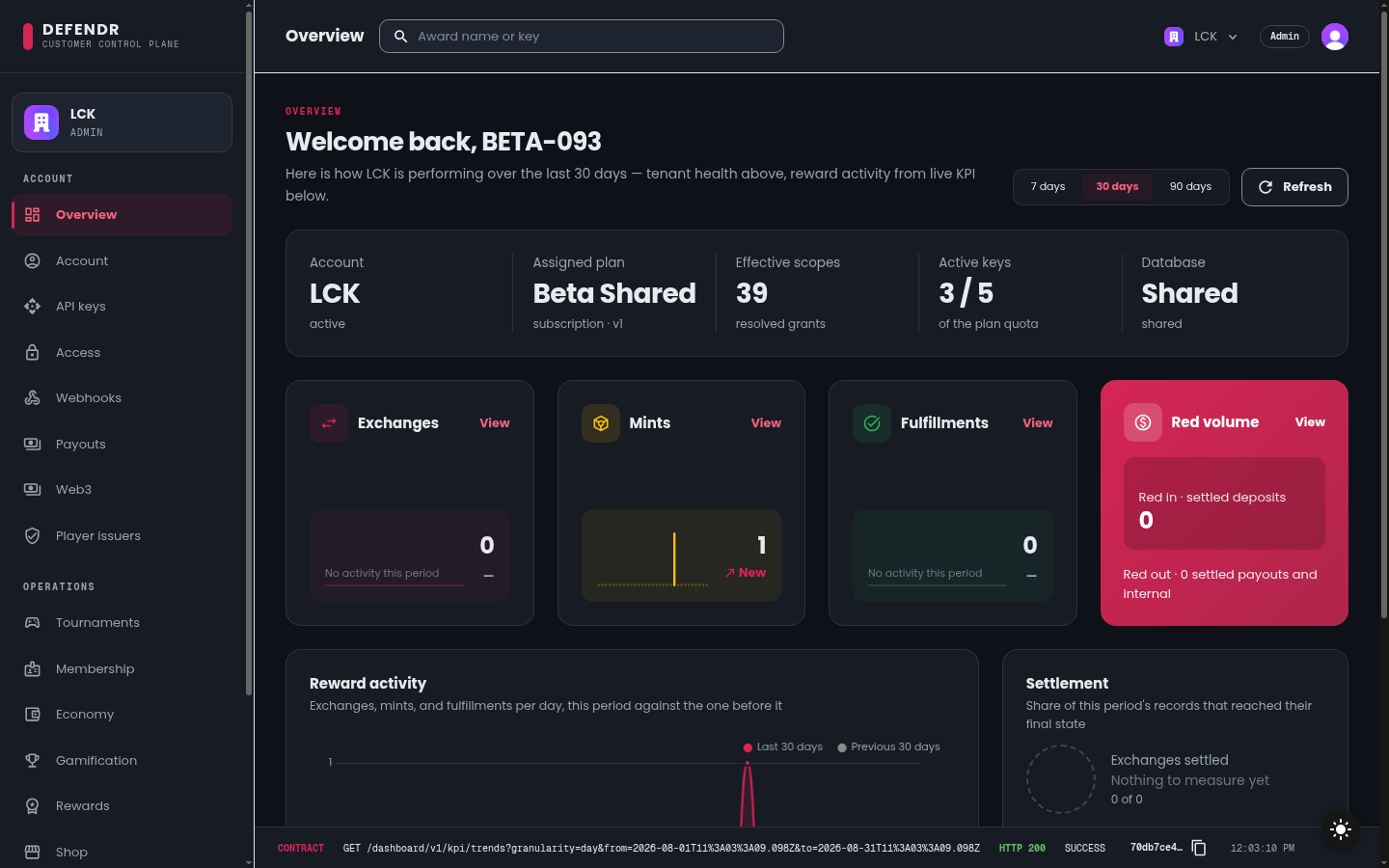
The overview
After you sign in, you land on Overview. The top row shows your tenant's health:
| Tile | What it tells you |
|---|---|
| Account | The tenant account your organization is bound to |
| Assigned plan | The plan that sets your rate limits, quotas and entitlements |
| Effective scopes | How many scopes your plan and entitlements currently grant |
| Active keys | How many API keys are active |
| Database | The storage tier and whether its connection is healthy |
A warning banner appears when something needs attention: no plan assigned, no effective entitlements, no active API key, or a database connection that needs attention.
Below that, Reward activity charts the selected period (7, 30 or 90 days) against the period before it: exchanges, mints, fulfilments and currency volume, plus how many of the period's records reached their final state. The search field in the top bar searches awards and exchanges.
Navigation
The sidebar has two groups.
Account holds your tenant's configuration:
| Page | Use it to |
|---|---|
| Overview | See tenant health and reward activity |
| Account | Keep your account profile current: identity, contact channels and social links |
| API keys | Create, scope, rotate and revoke API keys |
| Access | See the published plans and your entitlements, the ceiling on what an API key can be granted |
| Webhooks | Manage webhook endpoints, secrets and deliveries |
| Payouts | Connect your Stripe account for prize payouts |
| Web3 | Register your own testnet infrastructure |
Operations holds the day-to-day work:
| Page | Use it to |
|---|---|
| Tournaments | Inspect tournaments, their stages, match progression and standings |
| Membership | Define membership tiers and grant or revoke them |
| Economy | Manage your currency registry and post value to player wallets |
| Gamification | Author and approve missions, run seasons, chests, the level curve and leaderboards |
| Rewards | Award kinds, award definitions, grants, exchanges and Web3 verification |
| Shop | Write and publish shop listings |
| Player plane | Start a governed test session and exercise Player APIs |
| Recovery | Inspect and replay dead-lettered messages (see Dead-letter recovery) |
| Database | Review your database connection and manage its credentials |
Roles
The dashboard UI lets every organization member read its pages. It enables change controls for the organization's admin role and leaves them disabled for members. API keys and other Account pages also enforce that role on the server; Operations calls are authorized by the configured API key and its scopes. See Signing in.
What can go wrong
- "Choose an organization" instead of a page: you are signed in without an organization selected, or your organization is not yet bound to a Tanitar tenant. See Signing in.
- A section says it could not be loaded: that service did not answer. The rest of the page still works; use the page's retry or refresh control.
- A control is refused with a scope name: the key behind that action does not hold the scope. Contact Tanitar to adjust your plan or the dashboard's key.